

نرم افزار دیزاین بیلدر 2025
محدوده قیمت: 800,000تومان تا 3,000,000تومان
نرم افزار دیزاین بیلدر 2025 در تاریخ ۳۰ مه ۲۰۲۵ منتشر شده است و در حال حاضر در دسترس کاربران قرار دارد.
نرم افزار دیزاین بیلدر 2025 نسخه 2025.1.0.091
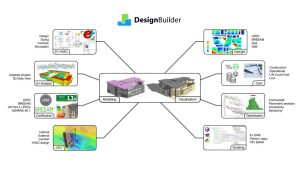
نسخه DesignBuilder 8.0.0.077 (نسخه v2025.1) در تاریخ ۳۰ مه ۲۰۲۵ منتشر شده است و در حال حاضر در دسترس کاربران قرار دارد. این نسخه بهصورت اختصاصی برای کاربران نسخه ۷ موجود است و هدف از آن شناسایی مشکلات احتمالی و بهبود قابلیتهای نرمافزار قبل از انتشار نهایی است.
🛠 ویژگیهای جدید در نرم افزار دیزاین بیلدر 2025
در این نسخه، چندین قابلیت جدید و بهبود در عملکرد نرمافزار ارائه شده است:
-
موتور شبیهسازی EnergyPlus v23.1 بهعنوان موتور اصلی شبیهسازی انتخاب شده است.
-
رابط کاربری و مدلساز:
-
استفاده از شمارهگذاری نسخه مبتنی بر سال.
-
فرمت جدید فایل مدل XML که سازگاری به جلو را فراهم میکند و تبادل داده با ابزارهای دیگر را آسانتر میکند.
-
امکان انجام عملیات اتحاد بولی روی چندین بلوک.
-
امکان تبدیل انواع مختلف بلوکها به یکدیگر.
-
بهبود ابزار واردات gbXML برای وارد کردن مدلها بدون مشکل.
-
افزایش سرعت بازسازی بلوکها.
-
-
LCA (تحلیل چرخه عمر):
-
یکپارچگی بیشتر با One Click LCA با استفاده از جدیدترین فرمت تبادل داده.
-
-
بهینهسازی:
-
ابزارهای جدید بصریسازی پارامتریک شامل نمودار حبابی، نمودار موازی و تحلیل پارامتریک از طریق لینک به پلتفرم تحلیلی آنلاین.
-
-
اسکریپتنویسی:
-
سازگاری با نسخه جدید Python v3.4.
-
-
بصریسازی:
-
نمایش مواد سطح بلوک و سایهزنی در بصریسازی دادهها.
-
-
استانداردهای سبز (LEED/ASHRAE 90.1/NECB):
-
بهبود گزارشدهی LEED v4.1 MEPC.
-
پشتیبانی از قالبهای NECB برای فعالیتها، ساختوساز، روشنایی و شیشهها.
-
-
HVAC:
-
گزارش بارهای جدید HVAC با فرمت استاندارد صنعتی و ذخیرهسازی بهصورت PDF.
-
امکان اختصاص بارهای گرمایشی به سیستمها برای طراحی سیستمهای گرمایشی.
-
حلقه هوای تازه DOAS.
-
نوع فن مدل سیستم جدید.
-
انواع منحنی جدید QuadLinear و QuintLinear برای استفاده با پمپهای حرارتی آب به آب و کویلهای پمپ حرارتی آب به هوا
-

EnergyPlus v23.1
DesignBuilder is the most mature and capable user interface to Energy Plus, our industry’s gold-standard Building Energy Simulation engine. DesignBuilder v2025.1 includes the EnergyPlus v23.1 engine with various performance and feature enhancements.
Extended Interoperability
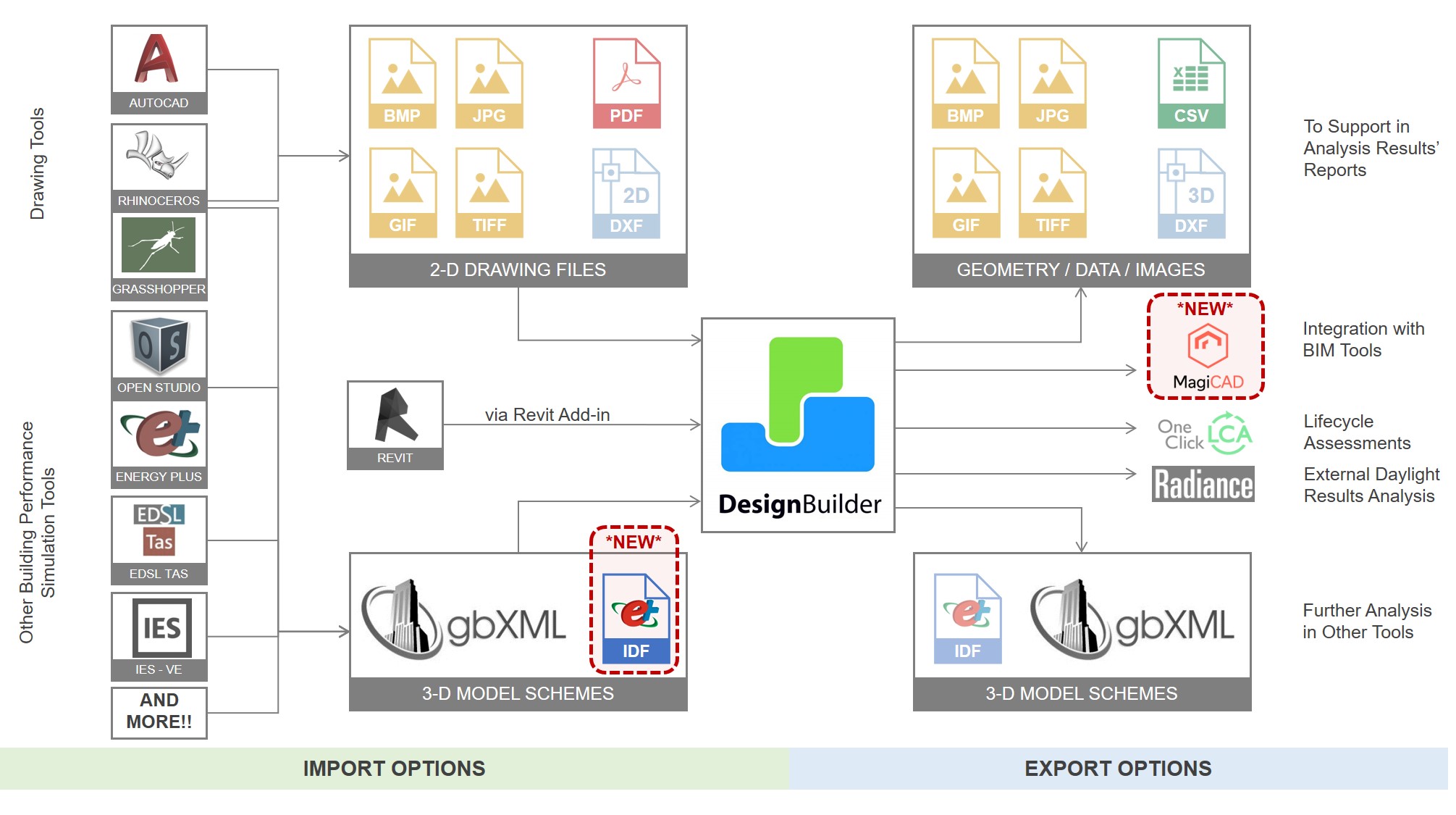
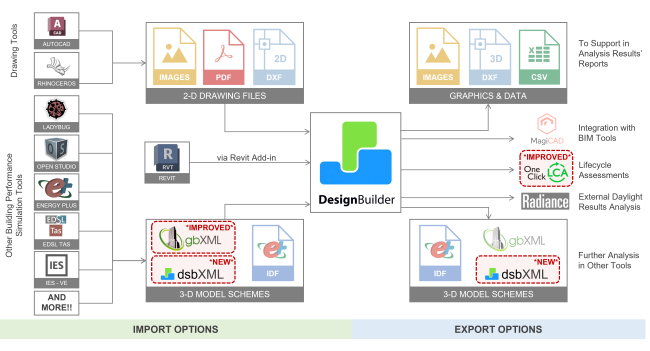
DesignBuilder provides multiple import and export options in a variety of formats to maximise interoperability with other tools. Two new interoperability options have been added in v7:
- You can now Import EnergyPlus IDF files created in 3rd party tools such as OpenStudio into DesignBuilder. The new IDF Import tool allows the building geometry, construction, glazing, materials and shading data in EnergyPlus IDF model files to be imported into a DesignBuilder model. Zones on the same storey are grouped into a block which makes re-partitioning and data organisation easier. All EnergyPlus versions from 7.2 forwards are supported.
- A new Link to MagiCAD allows you to export your loads from DesignBuilder to MagiCAD to further develop the heating, cooling and ventilation design. A typical workflow involves opening DesignBuilder directly from within the MagiCAD Revit plugin, running the loads calculations in DesignBuilder and importing the results back into MagiCAD where they can be used for equipment selection etc.
- Improvements to gbXML import for models with spaces that are not fully enclosed.
Daylighting
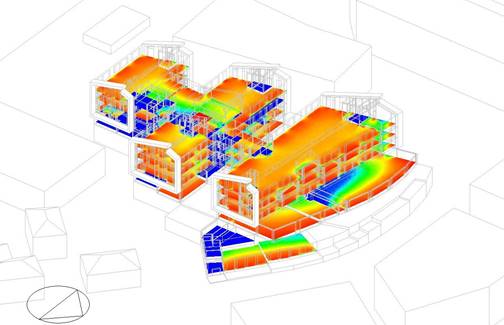
DesignBuilder v7.3.1.003 includes a major upgrade of our daylighting tools. The most important new features are:
- Annual Climate Based Daylight Modelling (CBDM) simulations are now run directly in Radiance fully implementing the method specified in LM-83-12, including dynamic blinds for sDA 300/50 calculations.
- New calculations and formatted reports are provided for:
- LEED v4.1 Daylight Credit Options 1 + 2 and
- BREEAM HEA 01 Option b annual daylighting credits.
- Translucent Component blocks can now be simulated in daylighting simulations making it easier to accurately include objects such as trees in your model.
- Daylight distribution maps are now displayed in the 3D modeller with options for numeric labels to be displayed in each cell and for colour palettes to be used. The new display helps make the context of the daylighting results clearer and your reports more impactful.
Modeller and Visualisation Tools
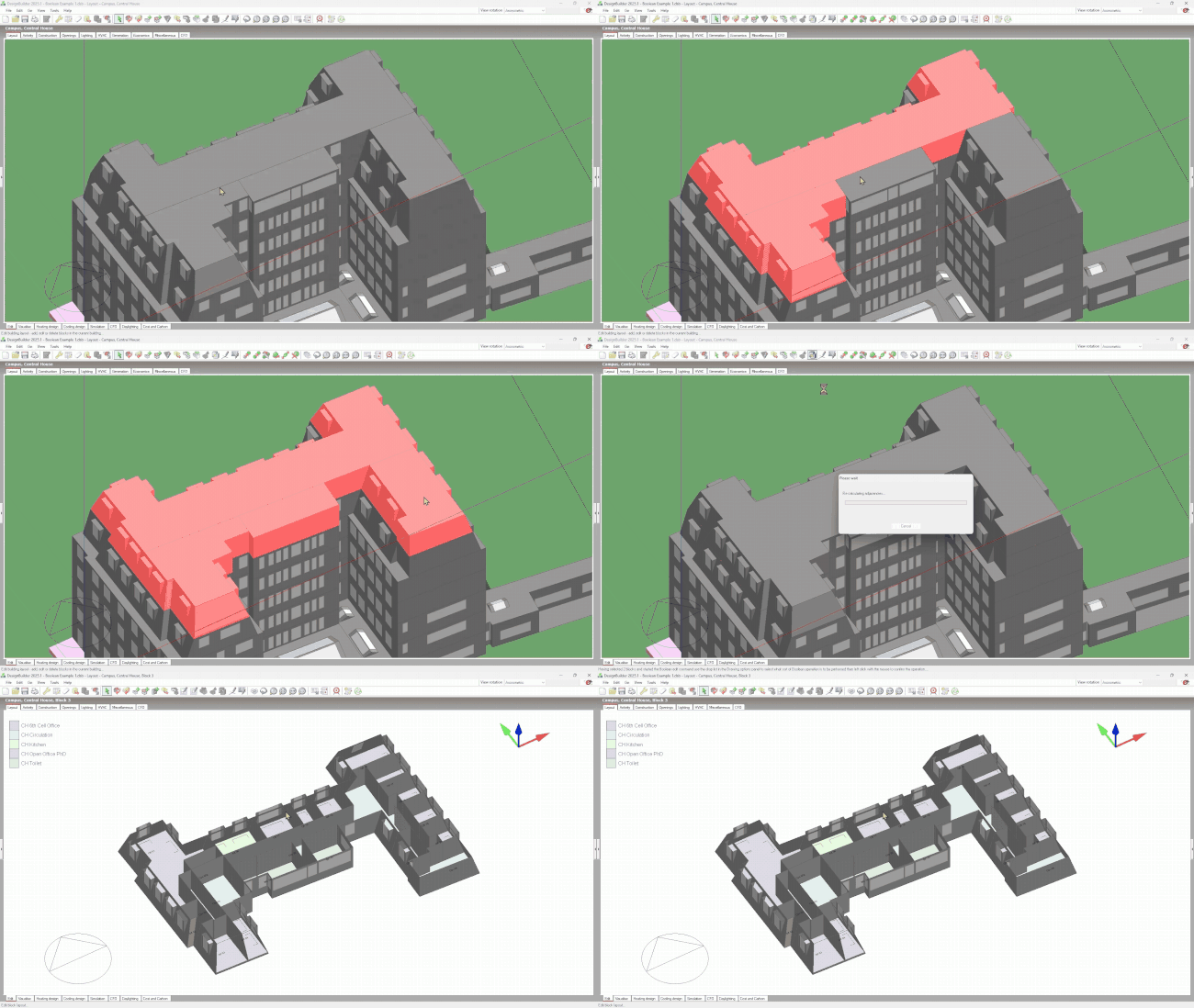
The modeller and visualisation tools sit at the heart of the DesignBuilder workflow, and the latest version sees some important improvements in this area:
- New open XML file format enables compatibility across DesignBuilder versions, including both forward and backwards compatibility.
- Boolean Union operations can be applied to multiple blocks, allowing several blocks to be conveniently combined in a single operation.
- All block types can now be converted to all other block types.
- Block rezoning performance improvements help reduce the time required to partition blocks into zones.
- Component block and shading surface materials are now displayed in Data Visualisations.
HVAC
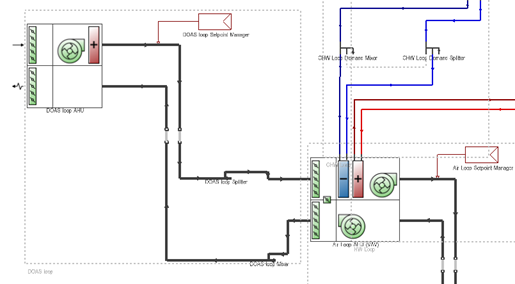
Significant improvements have been made to the HVAC design and simulation toolset:
- Enhanced HVAC Design Capabilities:
- HVAC Load Reports can be generated based on industry-standard tabular layouts. This is a Beta feature in v2025.1.
- Assign zone heating loads directly to systems, streamlining HVAC system design.
- DOAS Fresh Air Loops with a new generic fan type offer a more accurate representation of modern HVAC systems.
- New QuadLinear and QuintLinear curve types for use with water-to-water heat pumps and water-to-air heat pump coils.
New Insights Platform
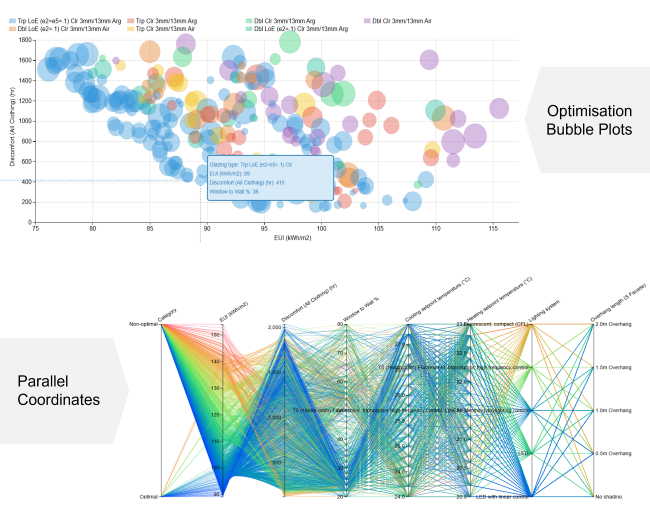
Our new online Insights platform provides a deeper, more interactive analysis of your optimisation, sensitivity, and parametric results. It features advanced visualisations like Bubble Plots, Parallel Coordinates Plots, and Parametric Analysis Charts, allowing for a more thorough exploration of your data.
Parallel Coordinates Plots: Use the “brushing” tool to refine the range of design variables or Key Performance Indicators (KPIs) of interest. The use of coloured lines helps you quickly identify trends or correlations that may not be apparent in other forms of data analysis.
Bubble Plots: Enhance your analysis by introducing additional data dimensions. Bubble size and colour can be used to represent a design option’s properties or relative performance, offering a more comprehensive view of the results.
Collaboration and Reporting: Beyond its powerful analysis capabilities, Insights enables you to generate high-quality graphics and share your results seamlessly with your team, helping to foster a more collaborative and evidence-based approach to design decision-making.
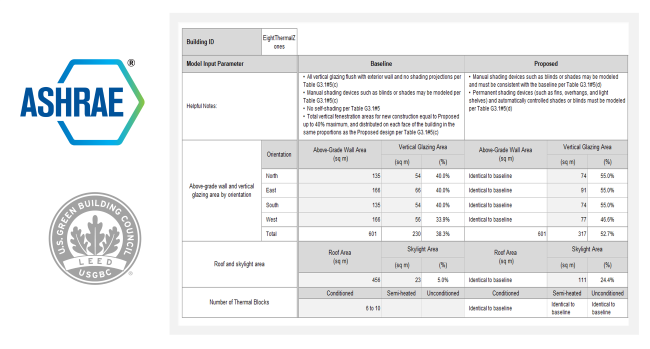
LEED/ASHRAE 90.1/NECB Updates
DesignBuilder offers an industry-leading workflow for assessing buildings according to the ASHRAE 90.1 Appendix G PRM and LEED standards. This new version updates and improves these tools:
- ASHRAE 90.1 2019 Appendix G is now supported
- Improved LEED v4.1 MEPC reports, ensuring compliance with the latest industry standards.
- Activity templates cover ASHRAE 62.1 for the years 2007, 2010, 2013 and 2016.
- Canadian NECB templates for improved productivity in model setup for activities, constructions, lighting and glazing systems.
Interoperability
DesignBuilder provides multiple import and export options in a variety of formats to maximise interoperability with other tools, and the new release sees some significant advances in this area:
- New open XML file format opens the door to efficient and accurate data exchange with other tools.
- New technical documentation supports third-party development and interoperability with the new DesignBuilder XML file format.
- Improvements to the gbXML import tool allow a wider range of models to import without issues.
Life Cycle Analysis (LCA)
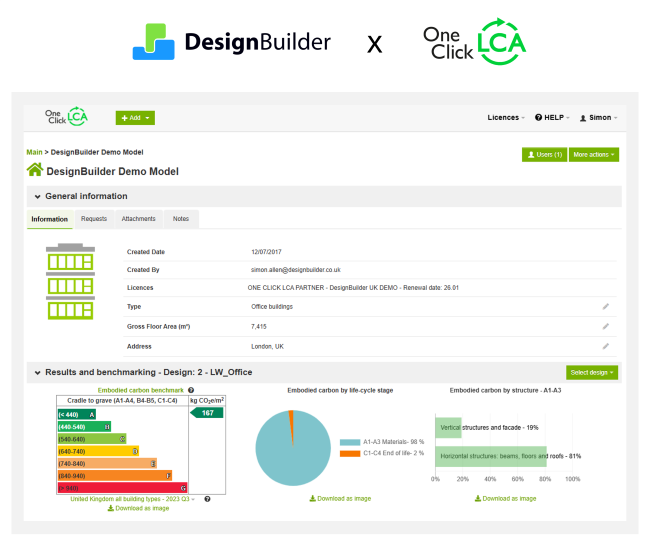
DesignBuilder includes two different LCA reporting methods: a link to the industry-standard One Click LCA platform, and a built-in report that sums the embodied carbon of materials in the model. Version 2025.1 includes improvements to both these methods.
- Enhanced reliability through a tighter integration with One Click LCA, leveraging its preferred native data interchange format, and ensuring reliable and accurate data transfer.
- More complete model export so you capture a fuller picture of your design by including materials for standard component blocks, PV panels, and local shading device materials, as well as those for building fabric and glazing.
- Flexible Glazing Definition allows the impact of glazing systems to be accurately accounted for, regardless of whether they are defined using the Simple or Material Layers method.
- Validated Accuracy: Tested against our internal embodied carbon calculations, which have also been updated and improved.
Extensibility
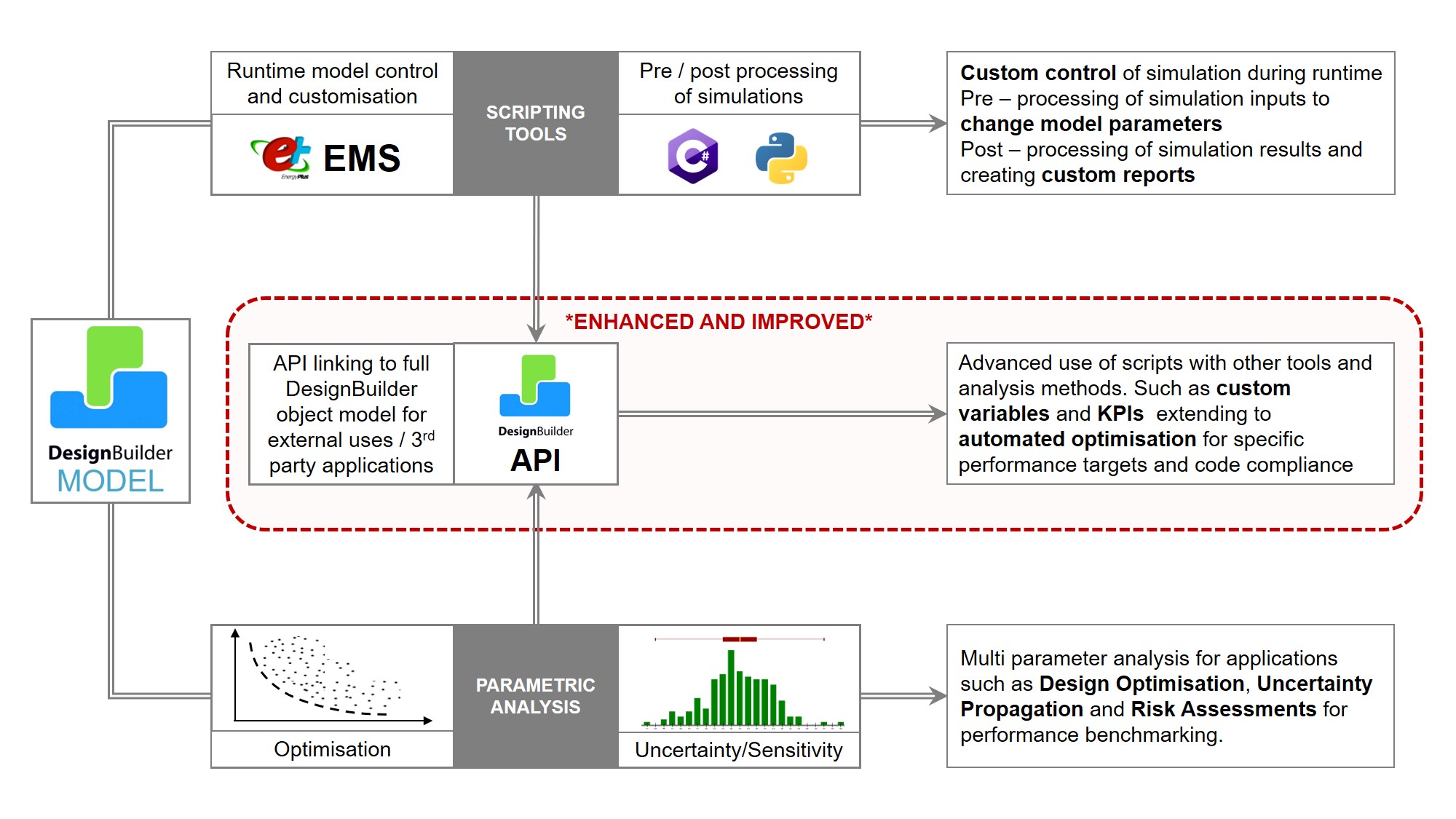
DesignBuilder provides a range of ways to extend its simulation, reporting and parametric capabilities, including runtime EMS scripts, C# and Python scripting and plugins. The latest version improves on its previous capabilities through:
- Python scripting is now compatible with Python release v3.4, allowing you to use a wider range of Python libraries in your scripts.
- New library and example Python scripts in our GitHub repository help make it easier to process your simulation results to create custom KPIs and design variables.
- Documentation is now provided on the DesignBuilder API and how to use it.
| Design builder |
بدون به روز رسانی ,با به روز رسانی یکساله ,با به روز رسانی 6 ماهه |
|---|
محصولات مرتبط
دانلود نرم افزار iX Runtime 4000 node (No Dongle) + iX Developer (V 2.52 – 2024-11-2 )
نرم افزار Password Protect Video Master 8.0 (آخرین به روز رسانی)

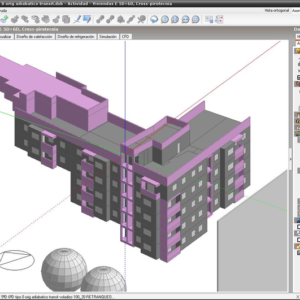
نرم افزار دیزاین بیلدر V 7.3.1.003
خرید دیزاین بیلدر نسخه 2025 از اینجا
نرم افزار راینو ورژن 7.1 آخرین نسخه با قابلیت به روز رسانی
نرم افزار لومیون 11
نرم افزار لومیون 2023 به همراه آموزش
نرم افزار لومیون 2024 – Lumion 2024.4.3 Pro with license
نرم افزار لومیون 2024 - Lumion 2024.4.3 Pro with license- یک نرم افزار قدرتمند برای تجسم سازی سه بعدی معماری به صورت بلادرنگ می باشد که می تواند ابزاری مفید برای معماران، برنامه ریزان و طراحان شهری محسوب شود. این برنامه برای ساخت فیلم و یا عکس های سه بعدی از یک محیط، با امکان چرخش سریع و تفسیر کامل محیط، بسیار مناسب خواهد بود تا از این طریق مسئولین پروژه بتوانند به طور کاراتری در هزینه و زمان انجام کارها، صرفه جویی داشته باشند. در حقیقت Lumion یک راه حل ساده برای ایجاد ویدئو و تفاسیر سه بعدی از یک مجموعه در حال توسعه است که با دیدن نتیجه کار شما می توانید کاملاً خود را در محیط شبیه سازی شده تصور کنید. با ما همراه باشید.
نقد و بررسیها
هنوز بررسیای ثبت نشده است.